I have been writing a simple application in iced and have run into a confusing layout problem
here is my code:
use iced::widget::{column, container, scrollable, row, text};
use iced::widget::{Container, Column};
use iced::{Background, Color, Length, Element};

fn new() -> () {
    ()
}

fn update(_state: &mut (), _message: ()) {
}

fn large_scrollable<'a>() -> Container<'a, ()> {
    container(scrollable(Column::with_children(
        (0..100)
            .map(|i| text(format!("list of things {}", i)).into())
    ).height(Length::Fill).width(Length::Shrink)
    ))
        .style(|_| {
            container::Style {
                background: Some(Background::Color(Color::from_rgb(1.0, 0.5, 0.5))),
                ..Default::default()
            }
        })
        .height(Length::Fill)
        .width(Length::Shrink)
}

fn small_fill_to_space<'a>() -> Container<'a, ()> {
    container(Column::with_children(
        (0..10)
            .map(|i| row![
                text(format!("a {}", i)).width(Length::FillPortion(1)),
                text(format!("b {}", i*i)).width(Length::FillPortion(1))
            ].into())
    ).height(Length::Fill).width(Length::Fill))
        .style(|_| {
            container::Style {
                background: Some(Background::Color(Color::from_rgb(0.5, 1.0, 0.5))),
                ..Default::default()
            }
        })
        // vvvv
        .height(Length::Fill) // if I change this to Shrink, the entire widget just disappears
        // ^^^^
        .width(Length::Fill)
}


fn empty_large_filler<'a>() -> Container<'a, ()>{
    container(
        text("nothing really")
    )
        .style(|_| {
            container::Style {
                background: Some(Background::Color(Color::from_rgb(0.6, 0.6, 0.6))),
                ..Default::default()
            }
        })
        .center(Length::Fill)
}

fn view<'a>(_state: &'a ()) -> Element<'a, ()> {

    let left_side = column![
        large_scrollable(),
        small_fill_to_space(),
    ]
        .height(Length::Fill)
        .width(Length::Shrink);

    row![
        left_side,
        empty_large_filler(),
    ].into()
}


fn main() {
    iced::application(new, update, view).run().unwrap();
}
Ideally what I am looking for is this green section shrinks to the size where it can display its text and nothing more and the red section fills in the rest.
problem is, if i set the green section to Shrink, the entire widget seems to disappear.
I have combined both screenshots into a single image because new users are only allowed to attach a single image:
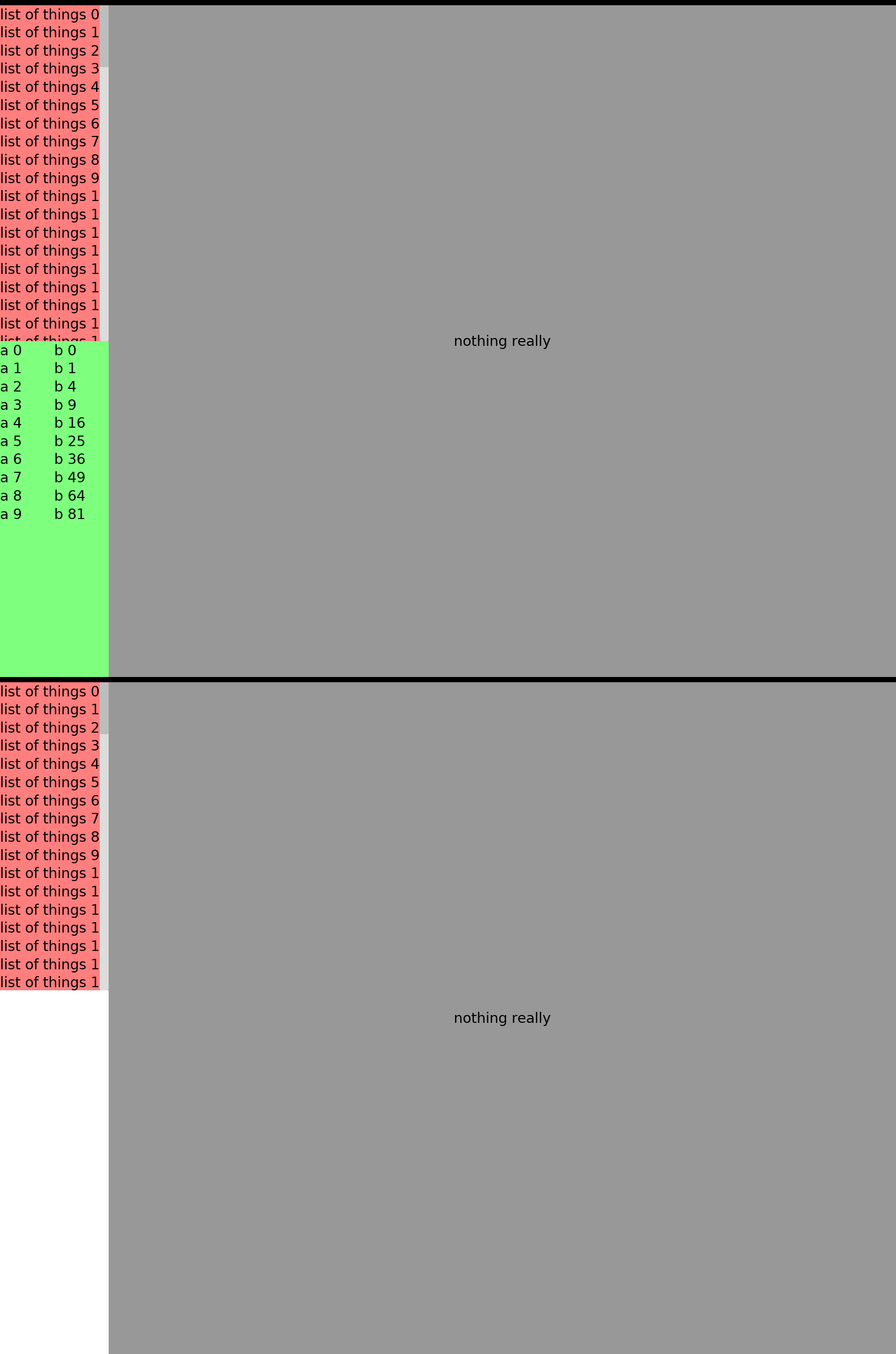
I have tried an absurd about of permutations of shrink and fill on every possible widget at this point and nothing seems to get me what I am looking for.